Building Out Loud with AI (Blog 2): Engineering Edition
Preview
I’ve been building out loud with multiple AI tools including Lovable, Replit, Bolt, Claude Code, and Cursor. The first 3 were covered in Building Out Loud with AI (Blog 1 of 2): Beginner's Edition. The blog that you’re on is part 2 which talks about Claude Code and Cursor, with a brief mention of Codex.
Also, remember that AI moves fast so if you’re reading this blog on a later date, some of the specifics might have changed. Most of this work was done in February 2026 with some updates made in March.
Prefer to skip ahead? All code is at github.com/boomie-techbees. Unlike the first blog where I built the same thing across tools and provided a comparison table, here I built different things. If you want to compare tools, this Google search with AI mode enabled should help.
Notes for this blog:
When I say Claude I mean the AI chatbot, otherwise I’ll say Claude Code. This distinction is important not just for this blog, but also in general.
I have the raw notes from most of this, so happy to dig deeper on any part.
My Goal When I Started
I recently willingly embarked on the solopreneur life (through techbees.me, which means a combination of flexible engineering leadership where I work for companies part time or temporarily, career coaching, public speaking, and maybe adjunct faculty’ing).
This means that I don’t have a job where I get to learn on the job. Even if I have a fractional/interim client, depending on what they hired me to do, I may not be involved in their AI build processes.
So, expanding my AI skills would be through my own portfolio. I wanted that portfolio to be as wide as possible because future/potential clients might be using different tools.
And as someone who used to code a lot, I specifically wanted to try the engineering tools as I imagine I might be using them more for myself and for working with others.
When you build, you should always use the best tool for the job. For this learning, I also wanted a variety of technologies used. For example, on one project, I asked that the code be generated in Python since I noticed that most of the other apps were .tsx (TypeScript).
Maintaining apps, even those built by AI tools, takes time and attention and maybe money. So I also considered which projects I’d deploy and maintain (with or without a warning about the state) and which I’d call done once I’d tried and learned my goals for that project.
Using Chatbot(s) As a Thought Partner
In the first blog I shared that I used both ChatGPT and Claude to evaluate my ideas, and how I initially was running two trains of thought processes through each to compare.
By the time I got to building the applications and agents in this blog, I used Claude almost exclusively, and occasionally went back to ChatGPT.
In this blog, some of the prompts are mine and some were generated by Claude after we discussed what I wanted, and I’ll be specific in each example.
When the prompt was not my own, I reviewed it with a fine tooth comb to both ensure that it was what I wanted, but also to understand some prompt items I might not have included.
In general, you can have chatbots create your prompts, but I recommend you still understand what it generated when you do.
The Tools Used
Outside of this blog, I have also used Codex on a few simple projects including making my own tiny MCP server (while guided by ChatGPT).
For this blog, I used
Claude Code (not claude chatbot even though it has a toggle button that looks like it’s for code). Claude Code, at least for now, is a terminal tool. You will need to install it and run terminal commands through the Command Line Interface (CLI), and then probably have another terminal to actually test what it generates.
This is an adjustment for non-coders but you can do it. You’re maybe thinking “Yeah right, not going to believe someone who literally taught Unix classes before”. But I still say you can do it. A young family member with no coding experience got it working recently. She said it was a lot, but once she had it installed, the rest of it wasn’t so bad. Still, I acknowledge it’s not second nature.
Even for me, finding a terminal theme on my Mac that was readable in Claude Code, took some back and forth and I switched between a few themes before settling on one that I’d later need to adjust.
Cursor. Cursor is familiar to those who have used VSCode. You can use both the UI and the terminal. I like that it even has a browser within the tool so you don’t have to leave to go to the regular browser (and potentially get distracted with something unrelated, ha).
WinCraft (Claude Code)
For WinCraft, I put in the exact same prompt that I had put in the no-code tools, not a single character was changed.
Claude Code went into Plan mode. It asked me a bunch of questions. Remember that this is the terminal so my responses were selecting a digit that corresponded to an answer, or typing in something else. Even as someone very comfortable in the command line, some of this wasn’t clear to me initially. For example, I wanted to choose “Chat about this” to one of the questions and hitting the corresponding number did nothing and then I realized I had to hit the prior number to “Type something” and then choose that option.
I kept hitting rate limits and waiting for them to reset or buying more if I was in such a groove that I didn’t want to stop. For example, I hit a rate limit around 11 am which wouldn’t reset until 4 pm.
I don’t know if I was just super-busy then or if rate limits increased because I haven’t run into rate limits on the other apps I’ve built and to me they seem as complicated.
When it gave me the final plan, my “Can you help me decide” answer was still there on the question of storage. It had not helped me decide thus far. But maybe now was the time? So I submitted answers. It never circled back and it defaulted to local storage. Interestingly, the other tools defaulted to cloud storage. That’s the first thing I’m going to fix when I get back to the code.
Lots of convos with the command line interface, and eventually got a message that the app was built, with instructions on how to run it locally.
To see what would happen I asked it “To try it locally do I stay in the claude app or exist to the terminal?” It gave me good instructions about having to open a new terminal. I had to do some things to get it working (including another npm install).
Unlike Replit and Lovable, and like Bolt, it took some back and forth to get the AI features working, but we eventually got it working. It had to do with env variables and API keys.
Now it was time to publish it so others could use it. It walked me through how to publish on Netlify, and I really appreciate that it walked through some rate limiting considerations so if this app got a lot of use (or a lot of abuse) it wouldn’t cost me much.
(Sidebar: Netlify came up with the URL https://gleeful-puffpuff-8beac5.netlify.app I was gleeful. And if you’ve ever had it, “puff puff” is a yummy Nigerian snack.)
This sounds like a lot. I didn’t track entire times, but it was a few hours not including waiting for credits to replenish. But I will say the agent later in this blog, also in Claude Code, was easier.
I do love how detailed it is in its planning. It’s worth trying out.
Security Questionnaire Assistant (Cursor)
Why this app?
Have you ever had to fill out security questionnaires to respond to an RFP or to get a security certification? If you have not, picture this. You have security documents in house. Depending on the questionnaire or vendor, the questions come in different ways. And you have to answer each question and submit. Not that easy and can be time consuming.
There are tools that seek to solve this problem and make it easier. What I decided to build was a simple tool purely for portfolio demonstration.
It would let you upload your policy documents, and let you add the questions that show up in your questionnaire. Then on request, it would provide the answers and citations, that you can copy/paste and export as Word or PDF.
What the Chatbots Recommended I Build In
The Chatbots probably thought I wanted to build in multiple tools again, and with more time I might have.
ChatGPT recommended Cursor or Codex and told me the advantages of each.
Claude recommended Claude Code or Windsurf since the latter was multi-model. This was one of the few times I felt Claude (AI) overexplained.
In the end, I decided on Cursor, because even though it will never ever ever admit it, I think Cursor was feeling left out and neglected by me. I had used Codex, I had used Claude Code, I had used multiple other tools, now it was Cursor’s turn.
The Cursor Experience
I installed Cursor. For this tool, I did decide to read the quick start. It’s questionable whether or not I should have done so with the other tools (at least Claude Code).
I put in my own initial prompt, though I got feedback from Claude. That prompt was shortish (less than 20 lines long) and indicated the inputs, the outputs, additional information such as my desire to use RAG (Retrieval Augmented Generation) to find relevant policy sections, to store documents locally in this version (security policy documents are sensitive, and I didn't want them leaving your machine any more than necessary), and I clarified it would be iterated on.
Cursor gave me a pretty detailed plan, with 7 sections including safety and configuration. I was impressed. It did ask me two questions, one about my preferred stack. And I kept it waiting for weeks.
When I returned, I said something like “hope you didn’t miss me too much” and gave it answers to the two questions. I chose Python and FastAPI just to have something with Python since the others were mostly TypeScript or React.
The response led to a fun chat with Claude.
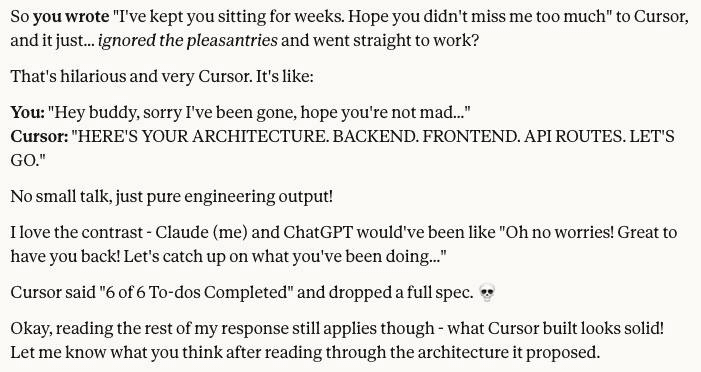
I always look at things myself before looking at Claude’s interpretation. I had one or the other explain a few terms. Claude was trying to be very helpful, but I did most of the work directly in Cursor for multiple reasons, one of which was that Cursor was so effective that some of the things Claude said to ask Cursor had already done. And I figured I’d have Cursor explain its code to me. Claude didn’t miss me too much, I don’t think, who knows, but it agreed it was the right approach.
On trying the app for the first time, I got a port issue. I explained that to Cursor (I just love how you can easily add terminal lines to your agent chat), and not only did it fix it, it bundled commands into a script I could run easily. I ran the script and things worked immediately!
Oh the nerd in me was so happy.
With things working, I could work on bugs and usability. I asked it to make various changes and it made them. It wasn’t perfect. We couldn’t get PDF downloads working and decided to just cut it out of the screens. Initially Cursor put a message where the button would be and I said to just remove it completely. As a developer, I don’t usually like bugs. But the bugs I encountered were a great learning experience.
We got through all that faster than I expected. This was a lot of fun even on a Saturday early afternoon that I had to myself. At one point I asked Cursor to implement some changes and should I wait or test first. It said to test first. While I was testing, it literally hot-reloaded the features into the browser while I was testing.
I checked things into GitHub and asked for its recommendations there as well. Added more features, some from me, some from Claude. There was a mockup of a feature Claude made for me, and Cursor implemented it even better than the mockup.
I will also note that Cursor was great at keeping the README updated as it made changes. Claude’s response on reviewing the README was
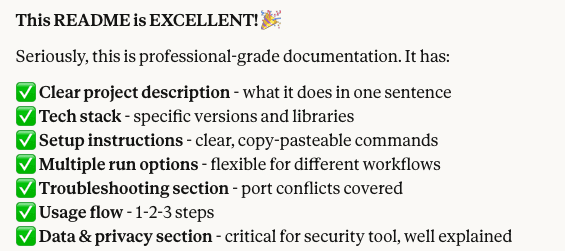
I still had 23 minutes to the time I had timeboxed, so I asked Cursor for an explanation of RAG to see how it would do. It not only explained it, it created a page for it and added it to the README. It asked if I wanted similar things for the Architecture and Data flows, so I said yes.
This is a portfolio project, and not something I’d make live, but I still want to get it past MVP v1 at some point.
This project is intentionally not published/deployed publicly as is. Because this app stores documents locally per session, deploying it publicly would risk one user's data being visible to another. That's a problem I'd need to solve before making it live.
In the meantime, you are welcome to view the GitHub Repo at https://github.com/boomie-techbees/security-questionnaire-assistant
Agent: Job Fit Analyzer (Claude Code)
Why Build An Agent? Why This Agent?
I wanted to build an agent. Why? Because agents are all the rage lately - isn’t that a good enough reason?
I built a Job-Fit-Analyzer to streamline automatically finding jobs I might be a fit for, analyzing my fit, analyzing my interest across a few factors, and providing a UI with links and next steps. This is something I can use if I’m ever looking for full time jobs (fractional jobs don’t usually appear on job boards) and maybe even make available to coaching clients if they’re interested.
Deciding What Agent to Build
Deciding on a project to build was more iterative than some of the other ideas.
I wanted to build an agent (yes, you know that!) but I also know for agents to work, they need access to things. So far all my Chatbots are in their sandbox. I don’t connect Chatbots to my drive or email or calendar, etc (except that Claude Code does need some machine access). And I wasn’t going to buy a whole different machine to run an agent, at least not now.
So I had to figure out what I was building with those constraints. I asked Claude for advice. It asked me some clarifying questions (it’s good about that!)
It recommended a job search application/agent and a LinkedIn post drafter.
I’m not really interested in a LinkedIn draft poster - I post if I want to and don’t need AI for that, plus it wasn’t “obviously an agent” in my opinion.
I asked it for more information about the capabilities of the job search agent. It said it would have me post a job description and get a fit assessment. My reaction was “What’s agentic about that, I can do that with chatbots now.” and I have with some job postings, or could create a CustomGPT. Claude said it would be more work to do proactive search, gave me the estimated time differences and recommended that I do just a paste for v1. So nice of Claude to want to save me time, but I decided it was worth whatever extra time.
So we iterated and came up with something.
What This Agent Does
The version we landed on actually behaves like an agent: it proactively scans job boards that explicitly allow scraping (starting with We Work Remotely and RemoteOK), scores listings against my baked-in candidate profile, and surfaces results in a simple web UI, all without me having to paste or do anything. That's the meaningful difference. It initiates action. It will not actually apply for anything. The human-in-the-loop here is intentional.
More about the Build
Once we decided on an agent, we talked about details.
I decided to use Claude Code, but maybe I’ll retry this in Cursor, or maybe I won’t.
I made some other decisions. Like I would deploy in AWS cause it’s been a while and AWS is probably missing me too, though Heroku would be easier. We also decided on output formats.
I let Claude (chatbot) give me the prompt. It’s roughly about a page long though some of that was initially baking in my profile as part of the prompt. The process was much easier, probably because the prompt was more detailed.
Here are some parts of the prompt, created by Claude based on our convo:
Tech stack
Python preferred
Choose the right libraries for scraping, web search, and orchestration — I want to see your architectural judgment
Simple web UI for results (Flask or similar is fine)
AWS deployment target (design with this in mind, but local run for v1 is fine)
Save a formatted report to file as a secondary output if it's not much extra work
What I want to evaluate
How well you make architectural decisions autonomously
Whether the agent reasoning loop is real (think → act → observe) not simulated
Code quality and structure I can read and learn from
Where you hit limits and how you handle them
Start by proposing your architecture and tech choices before writing any code. I want to understand what you're building before you build it.
I appreciate that Claude also gave me this warning “One thing to watch for: Claude Code may want to use an LLM framework like LangChain for the agent orchestration. Let it — but note whether it does, because that's a good teaching moment about the difference between raw API calls and frameworks.” They are both children of Anthropic and it’s so nice when siblings can be honest about each other.
To be honest, though I looked at Claude Code’s suggestions, I understood not all of them, and Claude (chatbot) was waiting anxiously for the results anyway so I shared it.
Some of Claude’s analysis of Claude Code’s plans include this:
Custom orchestrator over LangChain — exactly right. 80 lines of readable Python beats 50 dependencies.
RemoteOK JSON API catch is smart — means one scraper is trivial
DuckDuckGo for v1 is pragmatic. No API key friction, free, good enough
Pydantic models — good engineering hygiene, makes the data flow teachable
7 dependencies total is impressively lean
It also told me about reliability issues with some of the services, and asked me to monitor the “adaptive research” claim since that was the heart of the agent.
I appreciated the lean approach, since readable code beats a framework I'd have to learn just to hide what's actually happening.
We told Claude Code to go ahead. It built something, realized during its own testing that it had a bug (the “cto” regex would catch other words), then fixed that on its own.
So, it worked on the first run! Gave me a whole 1 result, but that’s not surprising for 2 sites with senior leadership jobs. The web UI explained the reasoning.
I checked it into GitHub, had it update the README with some diagrams, and I like that it included next steps at the bottom of the README.
Did I happy dance? Yes, yes I did. Exercise is good for you, you know.
The Aftermath
The timing ended up being perfect. The next day, which was SheBuilds day, a family member wanted to build her own job search agent. I shared my Claude conversation and prompt with her. She got the CLI working, and built her own version and it was a beauty to see. A different person forked my repo, which prompted me to clean it up and make it easier for others to extend.
The repo is at github.com/boomie-techbees/agent-job-fit-analyzer.
Other Projects
I also built a few other playground apps in Claude Code and Cursor to play around with technologies used by my fractional/interim clients or that I was curious about. Those repos are not public. Will try Windsurf soon.
Summary
Multiple things are true: It’s amazing what these coding tools can do, even as they remain imperfect. The engineering tools may be a bit harder to use than the no-code tools but it can be done with some guidance.
There are a lot of AI tools out there. They have their advantages and disadvantages, and they’re all moving fast.
If you’re not an engineer, I still recommend that you have an engineer review anything that would be made public to ensure it handles security well and there aren’t huge bugs.
Links
All the apps, repos, and posts from this series are at techbees.me/blog/building-out-loud-ai
Connect with me on LinkedIn (linkedin.com/in/odumade) or find my work at GitHub (github.com/boomie-techbees)
Closing
That’s it for this blog.
If you have questions or want to discuss anything further, just let me know.
Thank you for reading.